
Here's Sample Company's complimentary LinkedIn Ads audit.
Best Practices for LinkedIn Ad Accounts
There are best practices for each dimension of running a successful LinkedIn Ads account:
- Conversion & UTM tracking
- Retargeting set-up
- Audience targeting
- Bidding & creatives
We dive into each of them with best practices below. Then, in the Analysis section, we see what best practices had been implemented and which had not.
1. Conversion & UTM tracking
The first step for making sure your LinkedIn ads account is set up properly is to ensure that you're able to track its results. Otherwise, we're spending money without seeing what return on investment we're getting.
Best practices for UTM tracking: making sure you have global UTM parameters in place, so that when looking into your site's analytics provider, you can see the user journey from LinkedIn ads to your site and what they do on your site.
These parameters may look like this: utm_source=linkedin&utm_medium=paid-social&utm_campaign={{CAMPAIGN_NAME}}&utm_content={{CREATIVE_ID}}
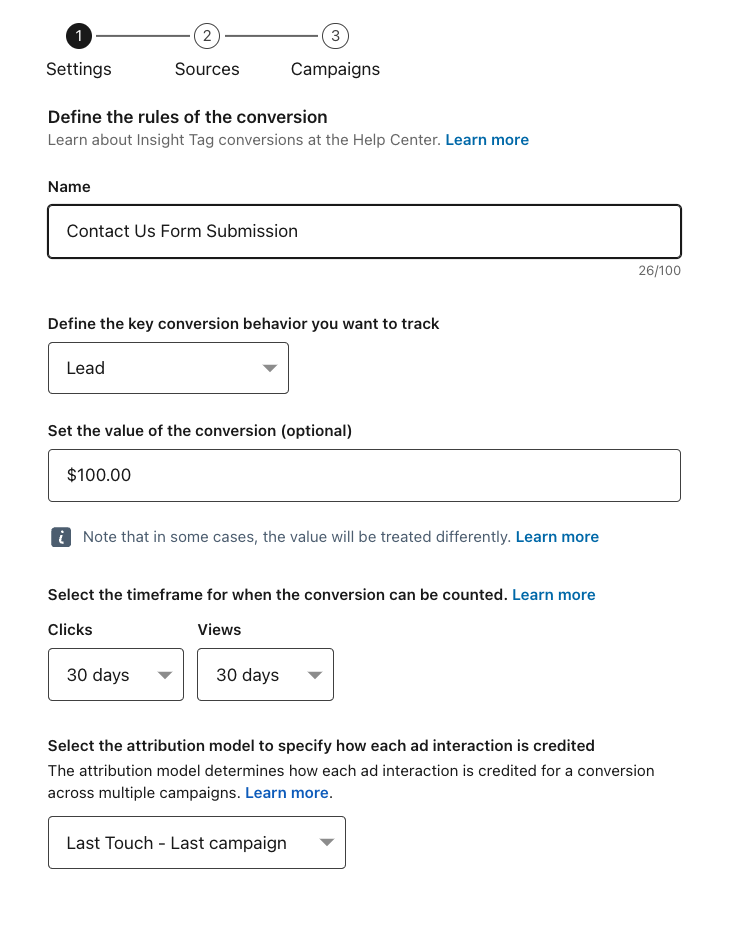
Best practices for conversion tracking: making sure that you've added the LinkedIn Insight Tag to your website's global footer and that you have set up conversion events, such as someone filling out a contact us form or scheduling a call on your site.
When we see that someone's done one of these events after seeing an ad, we know that the ads are generating quality events and we can then see if we're earning a positive ROI or not.
A conversion event in LinkedIn may look like this:
2. Retargeting set-up
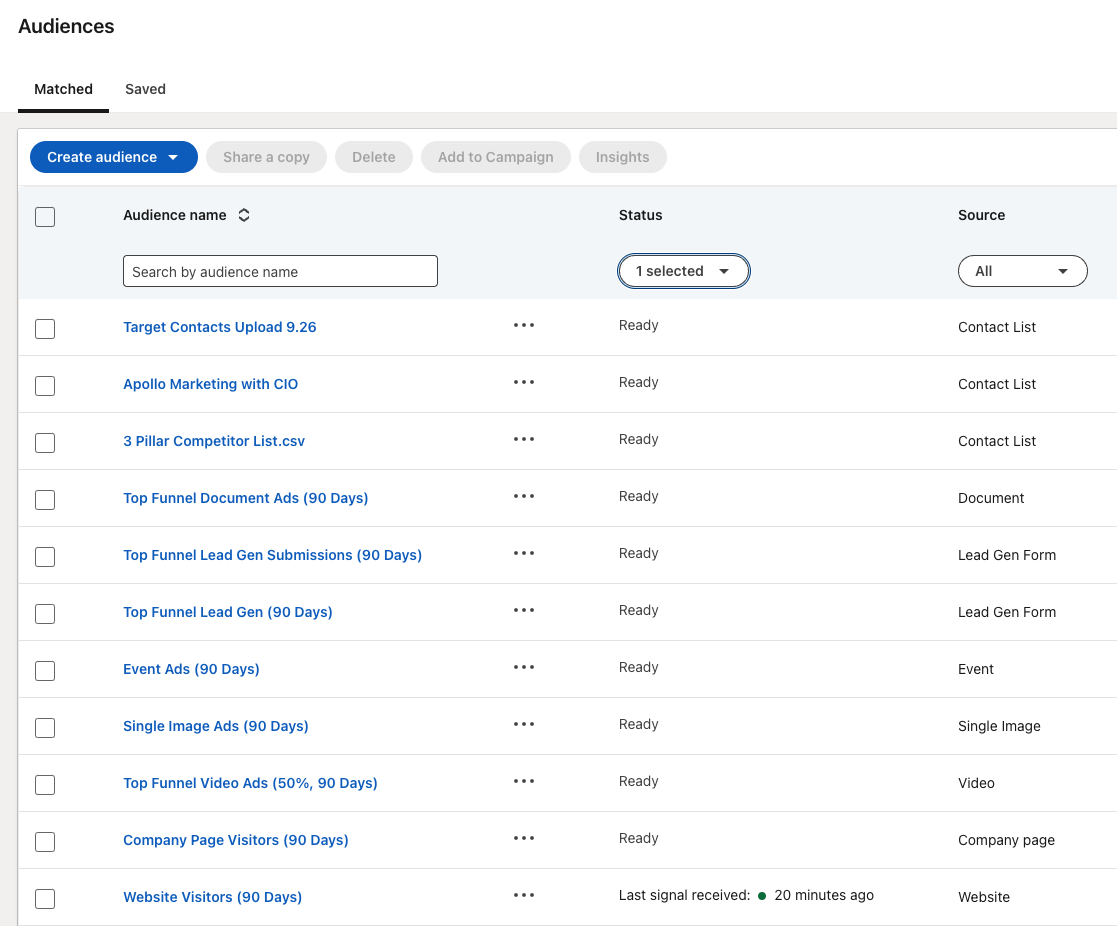
Next, we'll want to make sure the following retargeting audiences are set up - this way, we can differentiate the ads that we're delivering to people based on their own user experience with our brand.
Best practice for Retargeting audiences: Setting up all of the following, before you've launched your first ad:
- Company page visitors
- Website Visitors
- Specific, key webpage visitors
- Single image ad interactions
- Video views (say someone who's watched 50% of a video)
- Document ad interactions
- Lead generation form opens & submissions
- Lead generation form submissions (to set as an exclusion, because we don't want to advertise demo ads to people who have already requested a demo, for example)
Your audience section, once set up, may look something like this:
3. Audience Targeting
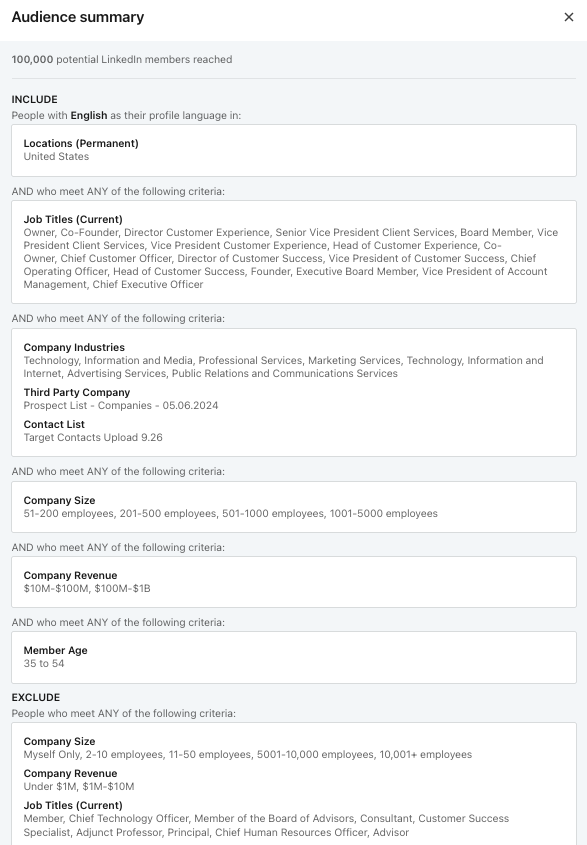
Now that the retargeting audiences are set up, we can begin with our audience targeting. The audience targeting section has several dimensions to choose from and we want to make sure that we're setting not only inclusions for the ads, but also exclusions, such as our competitors and customers who already have our offerings that we don't need to advertise to.
Best practices for audience targeting:
- Uploading the following lists, if available:
- Current customers
- Past customers
- Leads
- Target accounts
- Including or excluding your retargeting audiences, based on the goals of the campaign
- Ensuring you've disabled LinkedIn's Audience Expansion
- Ensuring you've disabled LinkedIn's Audience Network
- Having an audience size that is in-line with your budget - if the audience is too small, then we will likely deliver too many ads to the same people. On the counter side, if the audience is too large, we won't deliver the users enough ads to be memorable or familiar.
Once set up properly, your Top Funnel audience targeting may look something like this:
4. Bidding & creatives
Lastly, we have setting up the bidding for the ads to deliver affordably without sacrificing audience reach as well as the ads themselves.
Best practice for bidding: Manual bidding > Maximum delivery in 99% of cases. Start at the lower number of the recommended bid size and monitor your cost per click. If you find that your ads aren't delivering, increase the bid then.
Best practice for ads: Typically, you want 2 ads running in a campaign / one A/B test at a time, but no more than 2 A/B tests running at once.
LinkedIn's ad frequency cap is:
- Up to a max of 2 creatives / ads in a campaign shown to a person within a 24hr time period
- Up to a max of 5 creatives / ads in a campaign shown to a person within a 48hr time period
Meaning that in point 1, if someone logs into LinkedIn 3 times in a day, they'll just see a given ad in a campaign on two of the logins, then will have to wait until the next day to see more.
The issue with having a ton of creatives in a campaign is that if someone logs into LinkedIn 5x in a day, which can happen between desktop and mobile, they're essentially being beaten over the head with the same ads + that's 5 impressions that this person didn't interact with, thereby lowering engagements and relevancy score, making for both an annoyed user as well as higher CPCs as our relevancy is lower.
"We have had great results working with Chris to generate B2B leads for our consulting services! Thank you Chris for your professional approach! We will be happy to continue working together."

- Dmitri Rodenko, SaaS Founders
Here's What We Found in Sample Company's Account in the Past 90 Days
- Conversion & UTM tracking:
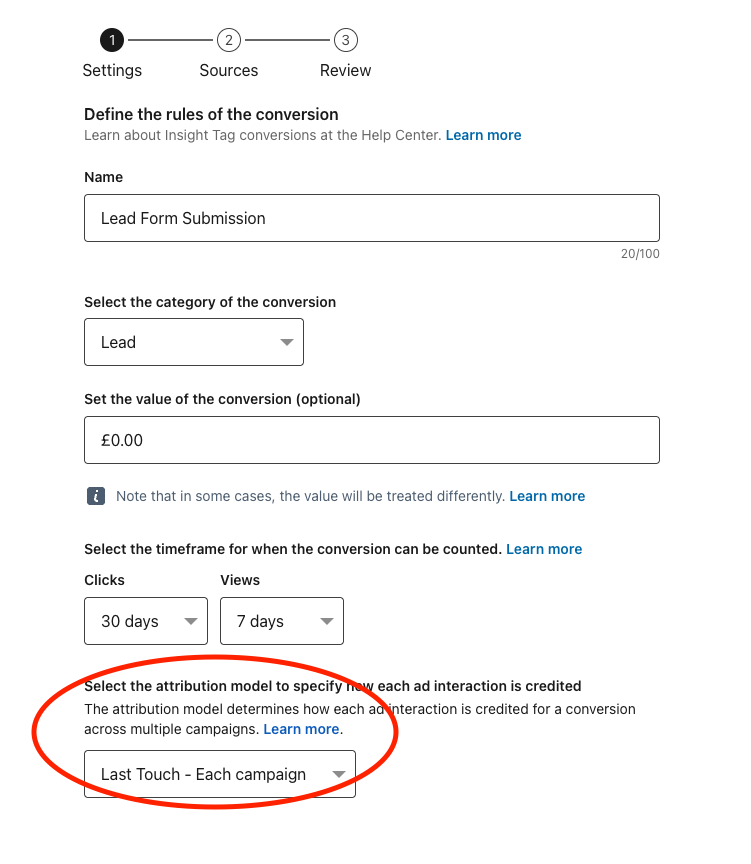
- You have the Lead Form Submission conversion event set up, but with a Last Touch - Each Campaign attribution, which means a conversion event will fire for every campaign that a person saw an ad in, meaning you're likely double, triple, etc. counting conversion events.
- You also have a "home page visit" conversion event, which seems like a bit of a throwaway.
- We did find UTM tracking parameters on the ads that had been running with calls to action to Sample Company's website, but more efficiently would have been setting up global tracking parameters as opposed to parameters on every individual ad - this way, you ensure the tracking is exactly the same for every campaign.
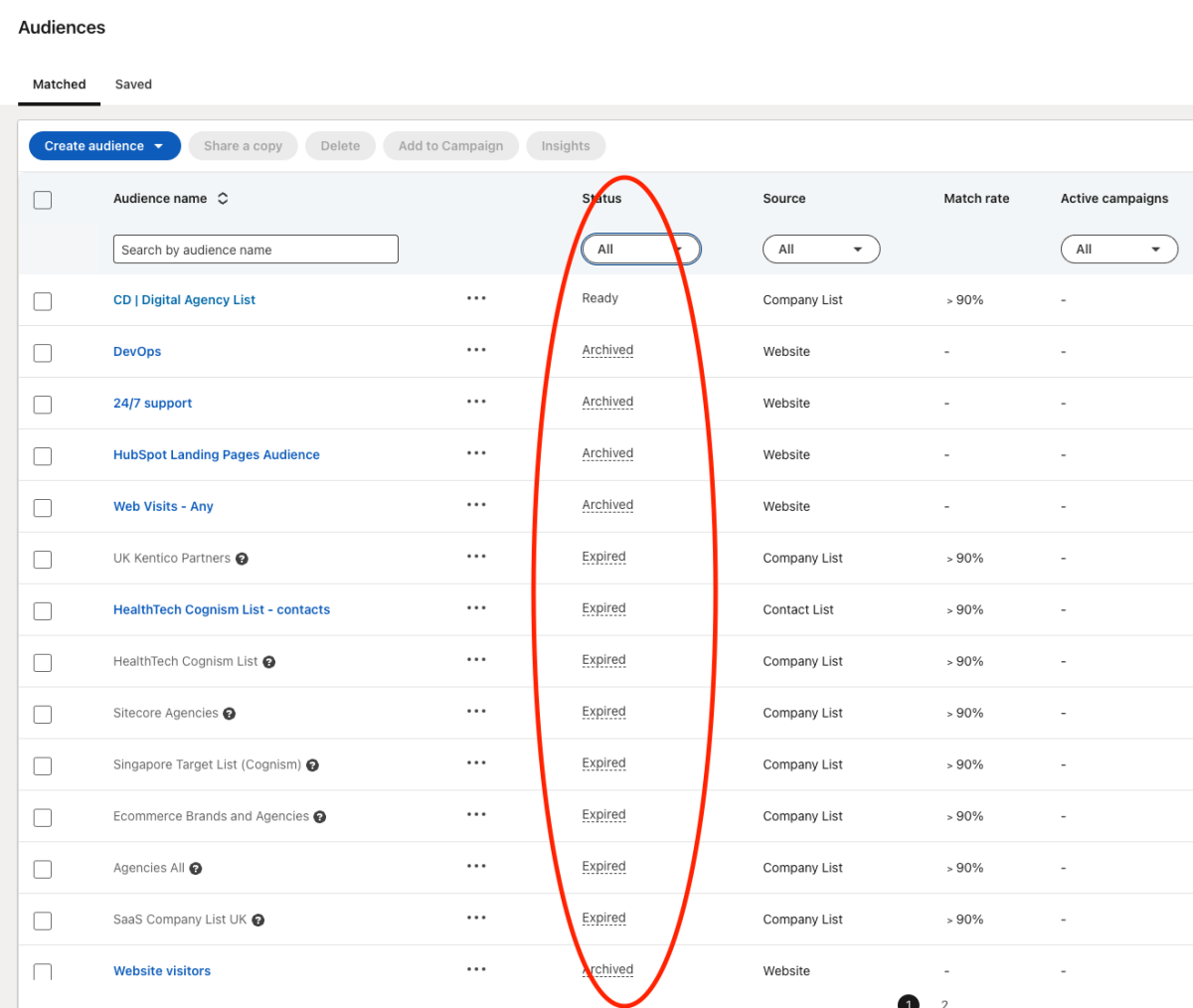
- Retargeting set-up: You have many retargeting audiences technically, but none are being utilized, hence why most show "archived" or "expired":
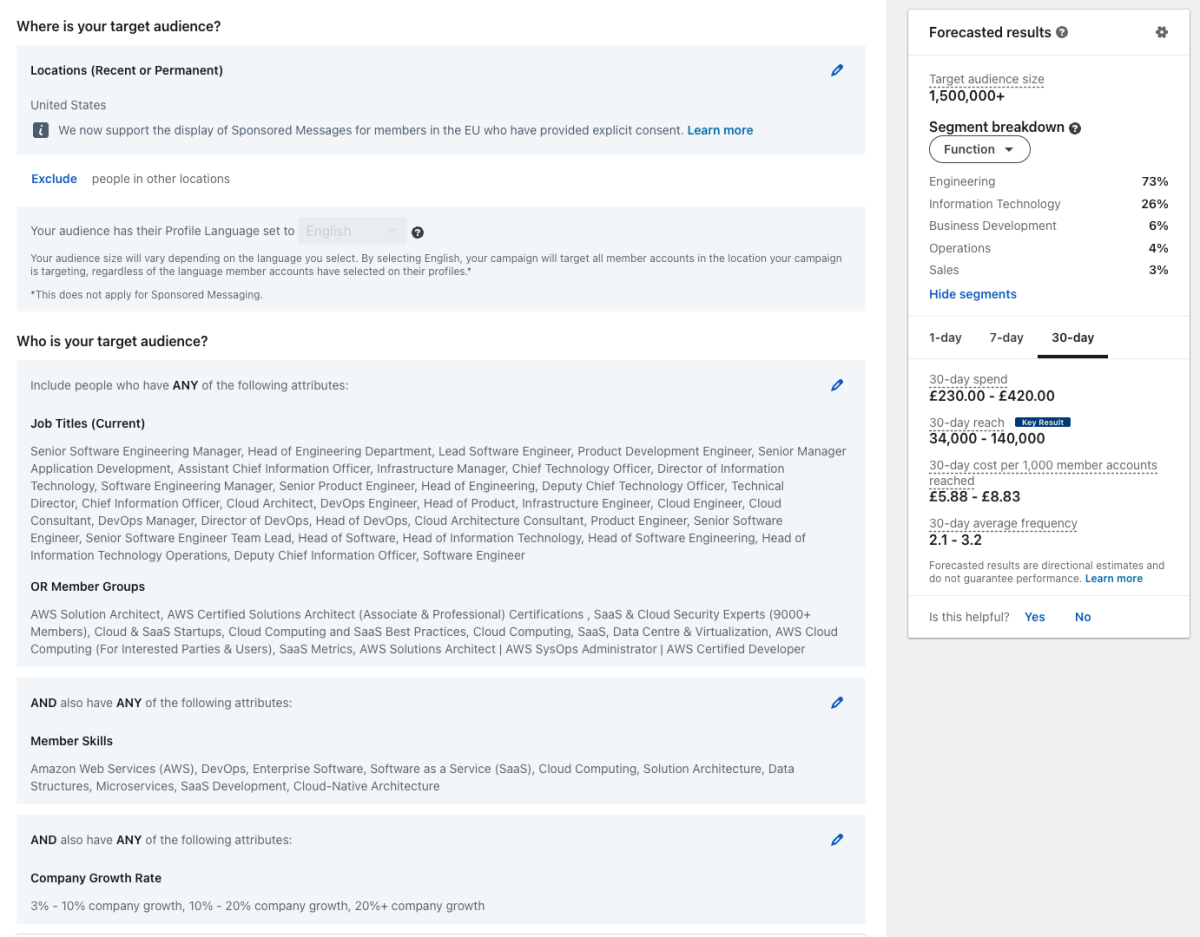
- Audience targeting: There's a few things here which are leading a lot of people outside of your ICP to be delivered ads. There's a bit much to type on this subject, please see the video linked above for more.
- Bidding & creatives:
- The video itself look fine, but we would recommend having a few other creative types running alongside these videos, such as Spotlight ads and Single image ads as well, then setting up retargeting Message ads, for example.
- There's only one video running in the video campaign, so there's no A/B testing happening.
- Personally, I'm not a fan of running "Maximum Delivery" bidding, but your costs per click didn't seem too bad here.

Audit Summary Next Tasks for Sample Company
- Set up your global UTM parameters & set up key website conversion events.
- Utilize a full funnel strategy with multiple ad formats.
- Have 2 creatives running in each campaign, conducting one key A/B test at a time.
- Run more asset types, such as single image ads, spotlight ads and retargeting message ads.
- Remove Audience Expansion & LinkedIn Audience Network from audience targeting.
Would you like to work with us to fix these audit findings and manage your LinkedIn ads?
Contact us below!
Feel free to contact us any time!
Email: chris@incampaignagency.com
Call or text: 1 (708) 497-9657
Schedule a 15 minute phone or virtual call with me here